Fallback web page
If you have integrated itsme in a specific flow that can only be completed in your app and not in browser, we highly recommend to provide a fallback web page in case the deeplink fails.
Scenario
- The user opens your app on their tablet and they click on a button to authorize something via itsme.
- Itsme is opened in the default browser app, but the itsme app is not launched because they have itsme not installed on their tablet.
- The user completes the itsme action on their phone.
- Once completed, the itsme web page on the tablet will automatically redirect to your redirect URL.
The problem: this last redirect does not open your app — the user is left on a webpage with no way to continue.
There are a lot of known issues that deeplinks are not triggered when there are too many page redirects. It’s required to have user interaction in between, like a button click.
Solution
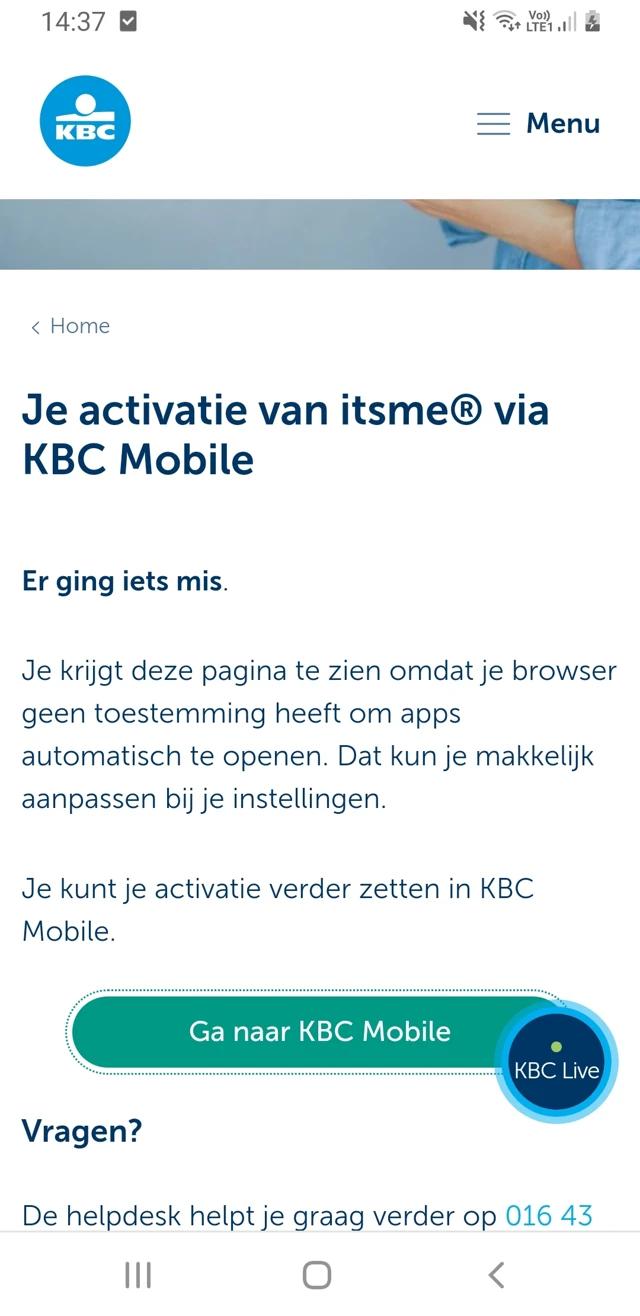
Rather than relying on an automatic redirect, implement a fallback web page that is displayed when the deeplink cannot be triggered automatically. This page shows a button the user can tap to open the app themselves.
Because the tap is a direct user action, the OS will correctly open the native app.
The button must open the URL in a new tab. Opening it in the same tab can cause the browser to cache the page and prevent the deeplink from firing.
Example from KBC