Overview
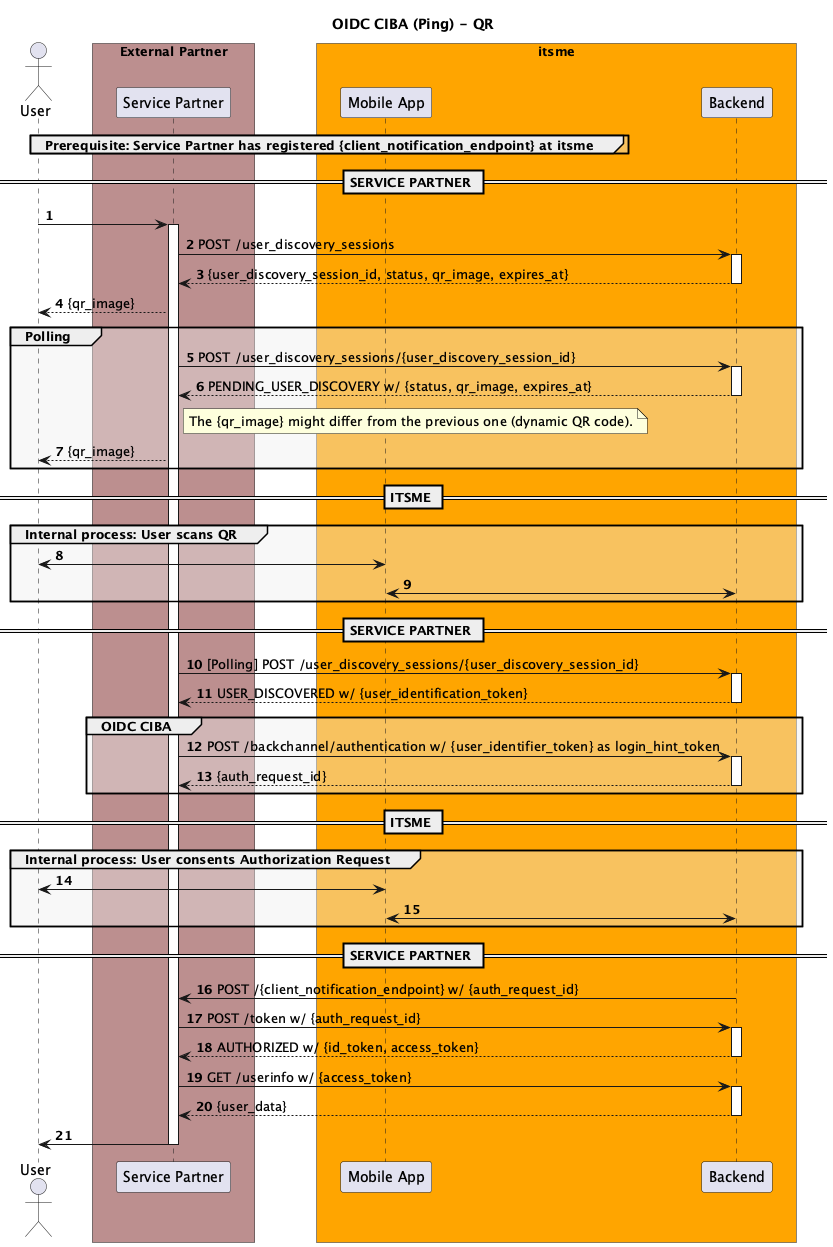
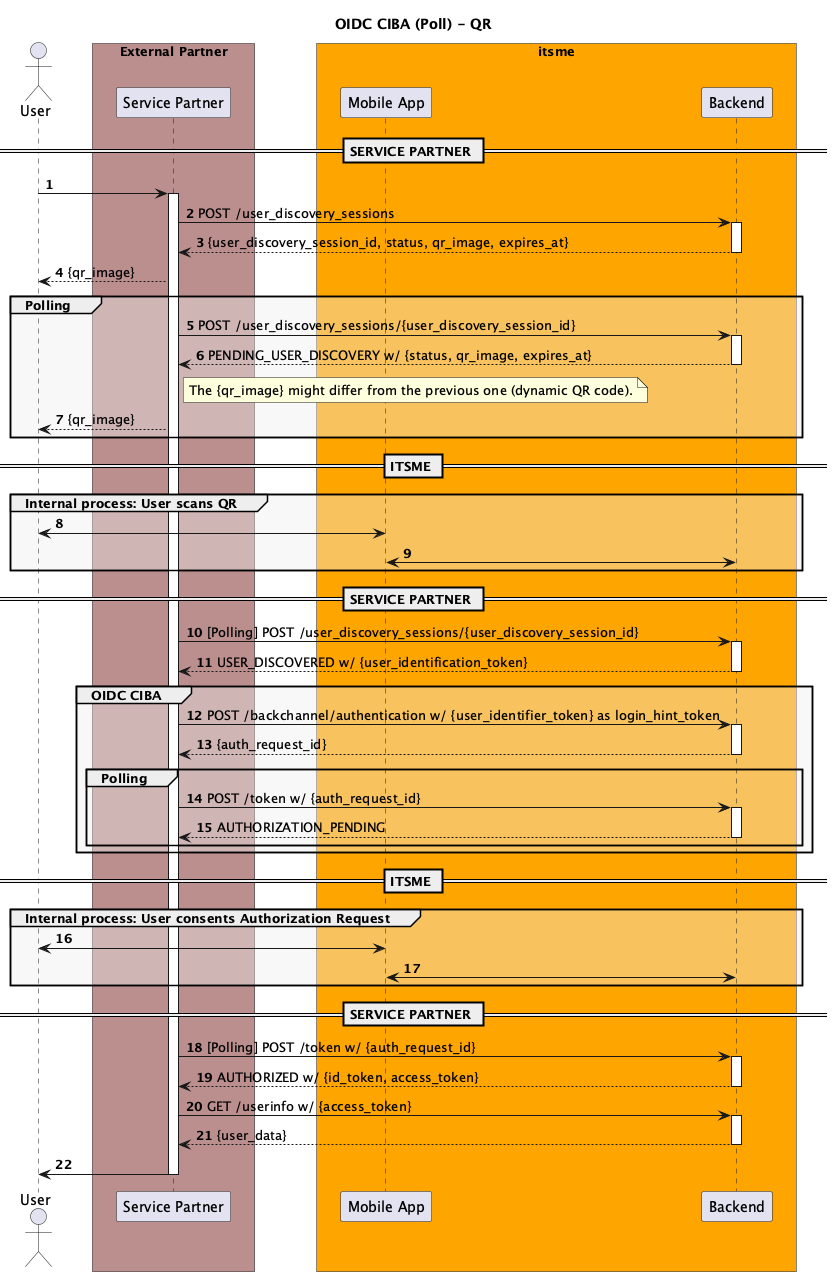
itsme® API supports an authentication flow based on the OpenID Connect CIBA (Client-Initiated Backchannel Authentication) specification. This flow enables partners to authenticate users in a host-to-host manner, without requiring any front-end interaction.
Since there is no direct interaction, the Client must provide a user identifier in the backchannel authentication request.
To support use cases where the Client does not have such a user identifier in advance, itsme® provides a proprietary User Discovery Flow. This flow allows the Client to obtain a user identifier prior to initiating CIBA authentication.
The User Discovery Flow involves displaying a QR code on the Client’s frontend, which the user scans using their itsme® mobile app. Upon scanning, the mobile app identifies the user and communicates with the itsme® backend, enabling the Client to receive a valid user identifier that can then be used to initiate a standard CIBA flow.
The diagram below describes both the User Discovery Flow & the OIDC CIBA Flow and how your systems should integrate with itsme®. A more extensive explanation of the flow can be found under Guides.
Onboarding
To make use of the itsme® OIDC CIBA API, you will need to contact our Customer Care team at onboarding@itsme-id.com. Based on your requirements, they will invite you to our self-service Portal where you will be able to configure an account. A clientID will be generated and linked to your account, which you will need to include in these requests:
POST /user_discovery_sessionsPOST /user_discovery_sessions/{user_discovery_session_id}POST /backchannel/authenticationPOST /token
Each partner can configure multiple “services” in the portal. Each service should correspond to one user flow on your side and can be of type Authentication, Identification, Confirmation or Data Sharing. The service code will also be required in your backchannel Authentication Request.
Guides
Request QR Code for User Discovery Flow
To use the User Discovery Flow via QR code, follow these steps:
- Initiate the User Discovery Session: The user clicks a button on the partner's device to trigger the partner to call
POST /user_discovery_session.
Partner calls endpointPOST /user_discovery_sessionsto create a new user discovery session. The response will include a QR code and a unique session identifier.
The response may contain anintervalvalue. The Partner is allowed to poll the session status via thePOST /user_discovery_sessions/{user_discovery_session_id}endpoint everyintervalseconds. If no interval value is present, default to 5 seconds. - Display the QR Code: Show the QR code from the response on the partner's device (web page, kiosk, terminal, etc.) for the user to scan with the itsme® app.
- User Discovery Poll for Session Status: Partner regularly polls endpoint
POST /user_discovery_sessions/{user_discovery_session_id}using the session identifier to check the status of the session.
If the status isPENDING_USER_DISCOVERY, the QR code has not yet been scanned. The endpoint can return a new QR code in the response, which will need to replace the old QR code on the partner's device.
The response may contain anintervalvalue. The Partner is allowed to poll the endpoint everyintervalseconds. If no interval value is present, default to 5 seconds.
Polling more frequently than allowed will result in a HTTP 429 error "Too many requests. Returned when the Client does not respect the polling interval."
Stop polling after 10 min when the responseUSER_DISCOVEREDis still not received. A HTTP 400 error will be returned when polling too long.
If the status isUSER_DISCOVERED, the QR code has been scanned and the response will include auser_identifier_token. This token can be used in the OIDC CIBA backchannel Authentication request.
Stop polling the endpoint once a response with this status is received.
Initiating the OIDC CIBA Flow
Once you have obtained the user_identifier_token from the User Discovery Flow, you can initiate the OIDC CIBA backchannel authentication request:
- Start the OIDC CIBA flow: Partner calls endpoint
POST /backchannel/authentication, including theuser_identifier_tokenas thelogin_hint_tokenparameter, along with your client credentials and any required scopes/claims. Currently we only support signed authentication requests. The response will include anauth_request_id. - Receiving the authentication result: When the user has completed authentication in the itsme® app, the partner will receive an
access_tokenandid_token.
We support the POLL and PING token delivery modes. Please let our Onboarding team know which flow you want to implement.- CIBA Ping mode: Once the end user has confirmed the action in their itsme® app, we will send a POST request on your preregistered callback endpoint. That request will contain your
client_notification_tokenas a bearer token. It will use theapplication/jsonmedia type and will only contain theauth_req_idas body content.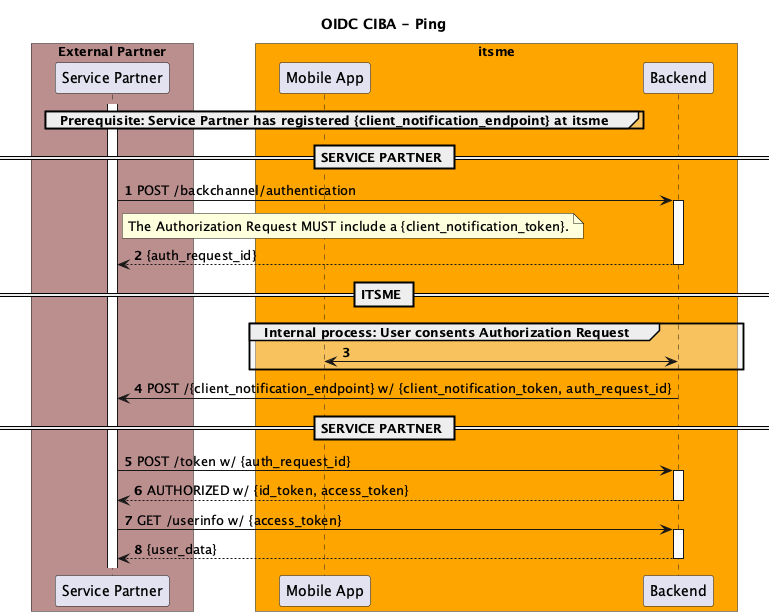
- CIBA Poll mode: Partner polls endpoint
POST /tokenwith theauth_request_idfor the authentication result. The response may contain anintervalvalue. The Partner is allowed to poll the endpoint everyintervalseconds. If no interval value is present, default to 5 seconds. Polling more frequently than allowed will result in aslow_downerror.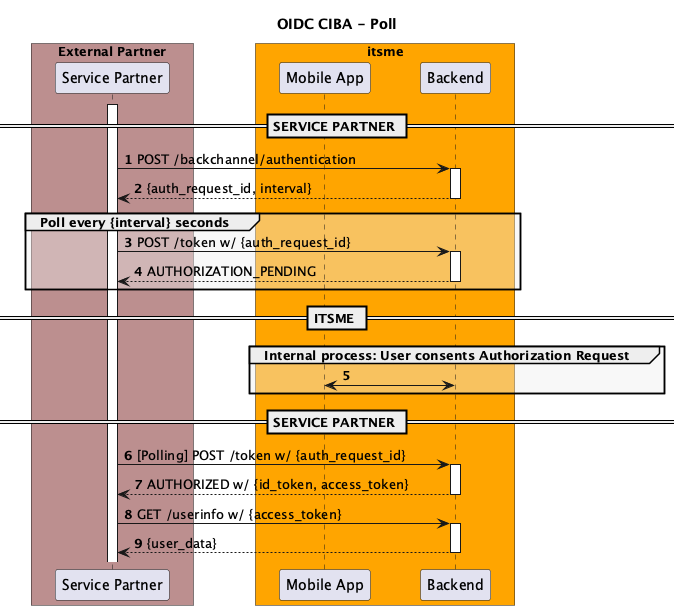
- CIBA Ping mode: Once the end user has confirmed the action in their itsme® app, we will send a POST request on your preregistered callback endpoint. That request will contain your
- Retrieve user data: Use
GET /userinfowith theaccess_tokento retrieve the user's attributes and metadata.
Securing the exchange of information
To protect the exchange of sensitive information and ensure the requested information gets issued to a legitimate application and not some other party, the OpenID Connect protocol uses JSON Web Token (JWT) which can be signed and/or encrypted.
Among the methods described in the OpenID specification, itsme® supports only Private Key JWT to secure communications between your backend and itsme® for the CIBA QR Process. Client Secret is not supported.
Public-private key pair and JWKSet URI
This method uses a pair of keys (1 public, 1 private) to encrypt and decrypt senders’ and recipients’ sensitive data. It is also known as public-key cryptography or asymmetric encryption.
You can retrieve the itsme® JWK Set from the URI mentioned as jwks_uri in our itsme® Discovery document.
Key rotation procedure
itsme® backend has a cache mechanism in place, which is sporadic (from 30min to 24h). During this time, we will keep on using old keys.
Rotating signing key:
- Add the new key to JWK set, with a new "kid"
- Start using the new key to sign JWTs
- When the flow is validated with the new key, remove the old one from the JWK set
Rotating encryption key:
- Replace the old key with the new one in JWK set, but still support old and new keys in decryption process
- Wait 24h (or wait for "max-age" amount of time, if specified)
- Decommission the old key completely
Changing the key could come along with changing the jwkset url. If that is the case, communicate the new available jwkset url to onboarding@itsme-id.com. It is not possible to be perfectly in sync, a few failed flows should be expected in the lapse of time between jwkset url update and the key update at the partner’s side. Smoother way would be:
- Copy the old jwkSet on the new URL
- The URL is communicated & registered by itsme®
- Rotate the keys in the jwkSet on the new URL as per rotating keys info above
Signing, encrypting and decoding JWTs
Libraries implementing JWT and the JOSE specs JWS, JWE, JWK, and JWA are listed here. For testing purposes only, we could advise the use of https://mkjwk.org/ for JWK generation and for payload check - these are 2 open-source tools which will help you visualize JWK mechanisms, client assertion construct. Please DO NOT generate production private keys on any website. Rather opt for the relevant SDK library mentioned here.
Token Confidentiality
All tokens issued by itsme® must be treated as confidential. These tokens must never be exposed to the user, browser, or any third party, and must only be used server-to-server.
List of all the issued tokens: user_identifier_token, auth_req_id, access_token, refresh_token and client_notification_token.
Certificates and website security
itsme® requires https connections to guarantee security. With the https protocol, a web site operator obtains a certificate by applying to a certificate authority with a certificate signing request. The certificate request is an electronic document that contains the web site name, company information and the public key. The certificate provider signs the request, thus producing a public certificate. During web browsing, this public certificate is served to any web browser that connects to the web site and proves to the web browser that the provider believes it has issued a certificate to the owner of the web site.
A certificate provider can opt to issue three types of certificates, each requiring its own degree of vetting rigor. In order of increasing rigor (and naturally, cost) they are: Domain Validation, Organization Validation and Extended Validation.
The Domain Validation certificate doesn’t provide sufficient identity guarantees to itsme®. So, only the Organization Validation and Extended Validation certificates are supported. For example, using the Let’s Encrypt open certificate authority is not sufficient because it only provide standard Domain Validation certificates.
Handling responses
Whenever a partner is sending a request to itsme®, they will get a response back. The format and content of the response depend on the endpoint and the flow.
Alongside the type of response, an HTTP status code is sent that shows whether the request was successful or not. If it was not, you can tell by the code and the message in the response what went wrong, why it went wrong and whether there is something the partner can do about it.
A successful response
An HTTP status 200 OK is issued whenever your request was a success.
You see this type of response in our examples like the one where we successfully retrieve the Token Response:
HTTP/1.1 200 OK
Content-Type: application/json
Cache-Control: no-store
Pragma: no-cache

{
  "id_token": "eyJhbGciOiJSUzI1NiIsImtpZCI6IjFlOWdkazcifQ....",
  "access_token": "SlAV32hkKG",
  "token_type": "Bearer",
  "expires_in": 3600
}
The error responses
Things will sometimes go wrong. For both the User Discovery Flow as the OIDC CIBA flow, a number of rules regarding the format of errors returned from our endpoints are defined.
User Discovery Endpoints errors
Same for both endpoints POST /user_discovery_sessions & POST /user_discovery_sessions/{user_discovery_session_id}.
400 Bad Request | Authentication request not valid. This will be the response after polling the endpoint for 15 min with same {user_discovery_session_id}. |
401 Unauthorized | Client authentication failed. |
Authentication Endpoint errors
error REQUIRED | A single ASCII error code.
| ||||||||||||||
error_description OPTIONAL | Human-readable text providing additional information, used to assist the developer in understanding the error that occurred. | ||||||||||||||
error_uri OPTIONAL | A URI identifying a human-readable web page with information about the error to provide the client developer with additional information. |
For example:
HTTP/1.1 400 Bad Request
Content-Type: application/json

{
  "error": "unauthorized_client",
  "error_description": "The client 'client.example.org' is not allowed to use CIBA."
}
Token Endpoint errors
If the request fails the Token Endpoint responds with an HTTP 400 (Bad Request) status code (unless specified otherwise) and includes the following parameters in the entity-body of the HTTP response using the application/json media type:
error REQUIRED | A single ASCII error code.
| ||||||||||||||||
detail OPTIONAL | Human-readable text providing additional information, used to assist the developer in understanding the error that occurred. | ||||||||||||||||
uid OPTIONAL | A URI identifying a human-readable web page with information about the error to provide the client developer with additional information. |
For example:
HTTP/1.1 400 Bad Request
Content-Type: application/json

{
  "error": "authorization_pending",
  "detail": "User has not completed authentication yet."
}
UserInfo Endpoint errors
When a request fails, the UserInfo Endpoint responds using the appropriate HTTP status code (typically, 400, 401, 403, or 405) and includes specific error codes in the response.
invalid_request | The request is missing a required parameter, includes an unsupported parameter or parameter value, repeats the same parameter, uses more than one method for including an access token, or is otherwise malformed. |
invalid_token | The access token provided is expired, revoked, malformed, or invalid for other reasons. |
For example:
HTTP/1.1 401 Unauthorized
WWW-Authenticate: Bearer realm="example"
Mapping the user
Mapping using sub claim
To sign in successfully in your web desktop, mobile web or mobile application, a given user must be mapped to a user account in your database. By default, your application Server will use the subject identifier, or sub claim, in the ID Token to identify and verify a user account. The sub claim is a string that uniquely identifies a given user account. The benefit of using a sub claim is that it will not change, even if other user attributes (email, phone number, etc) associated with that account are updated.
If no user record is storing the sub claim value, then you should allow the user to associate his new or existing account to the sub.
Benefit of sub claim
The benefit of using a sub claim is that it will not change, not even if other user attributes (email, phone number, etc.) associated with that account are updated.
Deleting and re-creating an itsme® account
In a limited number of cases (e.g. technical issue,…) a user could ask itsme® to ‘delete’ his account. As a result the specific account will be ‘archived’ (for compliancy reasons) and thus also the unique identifier(s) (e.g. “sub”).
If the same user would opt to re-create an itsme® afterwards, he will need to re-bind his itsme® account with your application server, in the same way as for the initial binding. After successful re-binding you will need to overwrite the initial reference with the new sub claim value in your database.
User Data
itsme® makes a range of user data available for its partners. These data elements (called “claims”) can be requested through the backchannel Authentication Request, either individually or as part of a broader “scope”. The claims are grouped into two categories:
User Attributes
User attributes are saying something about the end user. They are part of the identity of a person and we retrieve them from an identity document (ID card, passport…). Examples: name, address, birthdate, etc.
Metadata
Metadata are saying something about the data we have for an end user. They are not directly related to a person, but rather to an information about this person. Examples are the validityTo, the verificationDate etc. Those metadata, if requested, will only return values relating to the user attributes that are also requested. The metadata will then return an object containing one value for each relevant user attribute.
Examples:
The verificationDate is a metadata that has a value for most user attributes. So requesting the verificationDate AND the birthdate AND the given_name will return the following pattern for verificationDate:
"http://itsme.services/v2/claim/verificationDate": {
	"birthdate": "2023-06-01T13:04:26Z",
	"given_name": "2023-06-01T13:04:26Z"}
Requesting only the verificationDate will return nothing, as it only returns values for other requested attributes.
The validityTo metadata only has a value for BEeidSn and IDDocumentSN (because other attributes don’t have an expiry date). So validityTo will only return a value if BEeidSn and/or IDDocumentSN is also requested. Even if other attributes are requested, validityTo will not return a value for those other attributes.
API Reference
Currently, only Private Key JWT is supported for CIBA authentication. Client Secret is not supported.
itsme® Discovery Document
Public- And Private-Key
GET https://idp.[e2e/prd].itsme.services/v2/.well-known/openid-configuration
To simplify implementations and increase flexibility, OpenID Connect allows the use of a Discovery Document, a JSON document containing key-value pairs which provide details about itsme® configuration, such as the Authentication, Token and userInfo Endpoints, Supported claims, …
User Discovery Request
POST https://idp.[e2e/prd].itsme.services/v2/user_discovery_sessions
POST https://idp.[e2e/prd].itsme.services/v2/user_discovery_sessions/{user_discovery_session_id}
Parameters
client_id REQUIRED | It identifies your application. This parameter value is generated during registration. | ||||||||||||
client_assertion REQUIRED | Is a set of identity and security information, in the form of a JWT, used as an authentication method. The JWT MUST be signed, and MAY also be encrypted. If both signing and encryption are performed, it MUST be signed then encrypted, with the result being a Nested JWT. The JWT contains the following claims.
| ||||||||||||
client_assertion_type REQUIRED | Specifies the type of assertion. Set this to urn:ietf:params:oauth:client-assertion-type:jwt-bearer. |
Example
POST https://idp.[e2e/prd].itsme.services/v2/user_discovery_sessions
Host: idp.[e2e/prd].itsme.services
Content-Type: application/x-www-form-urlencoded

client_assertion=eyJraWQiO...
&client_assertion_type=urn%3Aietf%3Aparams%3Aoauth%3Aclient-assertion-type%3Ajwt-bearer
Response — PendingUserDiscoverySession
200 application/json
user_discovery_session_id | Unique session identifier as a string. |
status | PENDING_USER_DISCOVERY |
qr_code | Base64-encoded image of the QR code. The QR code might differ from the previous one (dynamic QR code). |
expires_at | String in YYYY-MM-DDThh:mm:ssZ date format specified by ISO 8601. |
Example
{
  "user_discovery_session_id": "abcdef...",
  "status": "PENDING_USER_DISCOVERY",
  "user_discovery_token": {
    "qr_code": "/9j/4AAQSkZJRgABAQAAZABk...",
    "expires_at": "2025-01-01T00:00:00Z"
  }
}
Response — DiscoveredUserDiscoverySession
user_discovery_session_id | Unique session identifier as a string. |
status | USER_DISCOVERED |
user_identifier_token | This token is a single-use user identifier. It is used to initiate the Authentication process in the OIDC CIBA Flow (POST /backchannel/authentication), and is not a persistent user identifier. It cannot be used to map or store user accounts in your database for future sessions. |
Example
{
  "user_discovery_session_id": "abcdef...",
  "status": "USER_DISCOVERED",
  "user_identifier_token": "abcdef..."
}
Authentication Request
POST https://idp.[e2e|prd].itsme.services/v2/backchannel/authentication
Signed authentication Request
This endpoint only accepts a signed Request Object (request JWT). All authentication parameters need to be included as claims. Requests with plain form parameters are not supported.
Parameters
request REQUIRED | A signed JWT containing all authentication parameters as claims.
| ||||||||||||||||||||||||||||||||||||
client_assertion_type REQUIRED | Specifies the type of assertion. Set this to urn:ietf:params:oauth:client-assertion-type:jwt-bearer. | ||||||||||||||||||||||||||||||||||||
client_assertion REQUIRED | Is a set of identity and security information, in the form of a JWT, used as an authentication method. The JWT MUST be signed, and MAY also be encrypted. The JWT contains the following claims.
|
Example
POST https://idp.[e2e|prd].itsme.services/v2/backchannel/authentication
Host: idp.[e2e/prd].itsme.services
Content-Type: application/x-www-form-urlencoded

request=eyJraWQiOi...
&client_assertion_type=urn%3Aietf%3Aparams%3Aoauth%3Aclient-assertion-type%3Ajwt-bearer
&client_assertion=eyJraWQiOiJsdGFjZXNidy...
Where the following is the JWT payload of request:
{
  "aud": "https://idp.e2e.itsme.services/v2",
  "login_hint_token": {
    "type": "subject_code",
    "value": "mqxews5ukc53ltb1jgj9qe9rnfnwwhyga18m"
  },
  "nbf": "2023-08-25T14:56:12.870Z",
  "scope": "openid service:TEST_LOGIN profile email",
  "iss": "s6BhdRkqt3",
  "claims": "{id_token:{name:null,gender:null}}",
  "exp": "1712757579",
  "iat": "1712757579",
  "jti": "4LTCqACC2ESC5BWCnN3j58EnA"
}
Response
200 application/json
auth_req_id REQUIRED | Unique identifier of the authentication request, generated by the OpenID Provider. Used by the client to poll the token endpoint. Treated as opaque. |
expires_in REQUIRED | Lifetime of the auth_req_id in seconds. After this period, the client must not use it. |
interval OPTIONAL | Minimum number of seconds the client must wait between token polling requests. Default is 5 if not provided. |
Example
HTTP/1.1 200 OK
Content-Type: application/json
Cache-Control: no-store

{
  "auth_req_id": "1c266114-a1be-4252-8ad1-04986c5b9ac1",
  "expires_in": 120,
  "interval": 2
}
PING callback
This callback will only happen if your service is configured for Ping mode.
Once the end user has confirmed the action in their itsme® app, we will send a POST request on your preregistered callback endpoint. That request will contain your client_notification_token as a bearer token. It will use the application/json media type and will only contain the auth_req_id as body content.
You should respond to that callback by calling the endpoint POST /token.
Example
POST /cb HTTP/1.1
Host: idp.[e2e/prd].itsme.services
Authorization: Bearer 8d67dc78-7faa-4d41-aabd-67707b374255
Content-Type: application/json

{"auth_req_id": "1c266114-a1be-4252-8ad1-04986c5b9ac1"}
Token Request
POST https://idp.[e2e/prd].itsme.services/v2/token
During this step, your application has to authenticate itself to our server using the public- and private-key pair method.
Parameters
client_id REQUIRED | It identifies your application. This parameter value is generated during registration. | ||||||||||||
grant_type REQUIRED | Fixed value urn:openid:params:grant-type:ciba. | ||||||||||||
client_assertion_type REQUIRED | Specifies the type of assertion. Set this to urn:ietf:params:oauth:client-assertion-type:jwt-bearer. | ||||||||||||
auth_req_id REQUIRED | Unique identifier received in the response of the authentication request, generated by the OpenID Provider. Treated as opaque. | ||||||||||||
client_assertion REQUIRED | Is a set of identity and security information, in the form of a JWT, used as an authentication method. The JWT MUST be signed, and MAY also be encrypted. The JWT contains the following claims.
|
Example
POST https://idp.[e2e/prd].itsme.services/v2/token
Host: idp.[e2e/prd].itsme.services
Content-Type: application/x-www-form-urlencoded

grant_type=urn%3Aopenid%3Aparams%3Agrant-type%3Aciba
&auth_req_id=YOUR_AUTH_REQ_ID
&client_id=YOUR_CLIENT_ID
&client_assertion_type=urn%3Aietf%3Aparams%3Aoauth%3Aclient-assertion-type%3Ajwt-bearer
&client_assertion=PHNhbWxwOl...
Where the following is the JWT payload of client_assertion:
{
  "iss": "s6BhdRkqt3",
  "aud": "https://idp.e2e.itsme.services/v2/token",
  "exp": 1537820086,
  "iat": 1537819486,
  "nbf": 1537818886,
  "jti": "4LTCqACC2ESC5BWCnN3j58EnA"
}
Response
200 application/json
access_token REQUIRED | Allows an application to retrieve consented user information from the UserInfo Endpoint. |
token_type REQUIRED | Provides your application with the information required to successfully utilize the access token. Returned value is Bearer. |
expires_in REQUIRED | Access token lifetime (in seconds). |
id_token OPTIONAL | A security token that contains information about the authentication of a user, and potentially other requested claim data's. The id_token value is represented as a signed and encrypted JWT. So, before being able to use the ID Token claims you will have to decrypt and verify the signature. |
Example
HTTP/1.1 200 OK
Content-Type: application/json
Cache-Control: no-store

{
  "access_token": "G5kXH2wHvUra0sHlDy1iTkDJgsgUO1bN",
  "token_type": "Bearer",
  "refresh_token": "4bwc0ESC_IAhflf-ACC_vjD_ltc11ne-8gFPfA2Kx16",
  "expires_in": 120,
  "id_token": "eyJhbGciOiJSUzI1NiIsImtpZ..."
}
Example of a decrypted id_token:
{
  "sub": "6g2k9rgglem2dttw5d51ulkxpv24phwatiu6",
  "aud": "WXw9DMqkEv",
  "birthdate": "1974-10-23",
  "gender": "male",
  "name": "John Ronald R Tolkien",
  "iss": "https://idp.prd.itsme.services/v2",
  "nonce": "nonce",
  "exp": 1699538407,
  "iat": 1699538107
}
Userinfo Request
GET https://idp.[e2e/prd].itsme.services/v2/userinfo
The UserInfo Endpoint returns previously consented user profile information to your application. In other words, if the required claims are not returned in the ID Token, you can obtain the additional claims by presenting the access token to the itsme® UserInfo Endpoint. This is achieved by sending a HTTP GET request to the Userinfo Endpoint, passing the access token value in the Authorization header using the Bearer authentication scheme.
Response
200 application/json
The UserInfo Response is represented as a signed and encrypted JWT. So, before being able to extract the claims you will have to decrypt and verify the signature.
Example
Request
GET /userinfo HTTP/1.1
Host: server.example.com
Authorization: Bearer SlAV32hkKG
Response
This is a response example containing all possible claims for a Belgian account:
HTTP/1.1 200 OK
Content-Type: application/json

{
  "http://itsme.services/v2/claim/validityFrom": {

## User Discovery Request

### Public- And Private-Key

```text
POST https://idp.[e2e/prd].itsme.services/v2/user_discovery_sessions
POST https://idp.[e2e/prd].itsme.services/v2/user_discovery_sessions/
{user_discovery_session_id}
Parameters
| client_id REQUIRED | It identifies your application. This parameter value is generated during registration. |
| client_assertion REQUIRED | Is a set of identity and security information, in the form of a JWT, used as an authentication method. To ensures that the request to get the id token and access token is made only from your application, and not from a potential attacker that may have intercepted the authorization code, the JWT MUST be signed, and MAY also be encrypted. If both signing and encryption are performed, it MUST be signed then encrypted, with the result being a Nested JWT (refer to this page for more information). The JWT contains the following claims. <table> <tbody> <tr><td>iss<br>REQUIRED</td><td>The issuer of the token. This value MUST be the same as the client_id.</td></tr> <tr><td>sub<br>REQUIRED</td><td>The subject of the token. This value MUST be the same as the client_id.</td></tr> <tr><td>aud<br>REQUIRED</td><td>The full URL of the resource you're using the JWT to authenticate to. Set this to https://idp.[e2e/prd.itsme.services/v2/backchannel/authentication</td></tr> <tr><td>jti<br>REQUIRED</td><td>An unique identifier for the token, containing maximum 255 characters.</td></tr> <tr><td>exp<br>REQUIRED</td><td>The expiration time of the token in seconds since January 1, 1970 UTC.</td></tr> <tr><td>iat<br>OPTIONAL</td><td>The time at which the JWT was issued.</td></tr> </tbody> </table> |
| client_assertion_type REQUIRED | Specifies the type of assertion. Set this to urn:ietf:params:oauth:client-assertion-type:jwt-bearer. |
Example
POST https://idp.[e2e/prd].itsme.services/v2/user_discovery_sessions OR
POST https://idp.[e2e/prd].itsme.services/v2/user_discovery_sessions/
{user_discovery_session_id}
Host: idp.[e2e/prd].itsme.services
Content-Type: application/x-www-form-urlencoded
client_assertion=eyJraWQiO...
&client_assertion_type=urn%3Aietf%3Aparams%3Aoauth%3Aclient-assertion-type%3Ajwt-bearer
Response PendingUserDiscoverySession
200 application/json
| user_discovery_session_id | Unique session identifier as a string |
| status | PENDING_USER_DISCOVERY |
| qr_code | Base64-encoded image of the QR code. The QR code might differ from the previous one (dynamic QR code). |
| expires_at | String in YYYY-MM-DDThh:mm:ssZ date format specified by ISO 8601 |
Example
{"user_discovery_session_id" : "abcdef...",
 "status" : "PENDING_USER_DISCOVERY",
 "user_discovery_token" : {
  "qr_code" : "/9j/4AAQSkZJRgABAQAAZABk...",
  "expires_at" : "2025-01-01T00:00:00Z"}}
Response DiscoveredUserDiscoverySession
| user_discovery_session_id | Unique session identifier as a string |
| Status | USER_DISCOVERED |
| user_identifier_token | This token is a single-use user identifier. It is used to initiate the Authentication process in the OIDC CIBA Flow (POST /backchannel/authentication), and is not a persistent user identifier. It cannot be used to map or store user accounts in your database for future sessions. |
Example
{"user_discovery_session_id" : "abcdef...",
 "status" : "USER_DISCOVERED",
 "user_identifier_token" : "abcdef..."}}